

Exp +24%
Loot +24%


Top 5 Exp Today
531,609,462
485,600,939
477,629,593
467,995,370
35,966,543
18,026,863
8,852,302
2,712,380
530,335
527,960
2,259,898,106
2,018,514,312
1,321,199,302
467,229,302
408,078,670
350,037,308
90,089,182
11,794,505
11,749,160
6,776,984
Top 5 Players
Top 5 Killers
29
24
21
14
13
Characters For Sale
Level: 208
Level: 231
Level: 258
Level: 349
Level: 318
Supply Box
(November)

 Key BunchGuaranteed
 Box Magic ShopGuaranteed
 Tiguer Trophy10.0% Chance
 Crocodile Trophy10.0% Chance
 Blood Herb10.0% Chance
 Backpack10.0% Chance
 Super UH10.0% Chance
 Super SD10.0% Chance
 Crystal Coin10.0% Chance
 Platinum Coin10.0% Chance
 Auto Loot Time10.0% Chance
 Soul Rune10.0% Chance
 Special ItemMonthly Bonus
 Brotherhood Outfit TokenEvery 8 boxesKey BunchGuaranteedBox Magic ShopGuaranteedTiguer Trophy10.0% ChanceCrocodile Trophy10.0% ChanceBlood Herb10.0% ChanceBackpack10.0% ChanceSuper UH10.0% ChanceSuper SD10.0% ChanceCrystal Coin10.0% ChancePlatinum Coin10.0% ChanceAuto Loot Time10.0% ChanceSoul Rune10.0% ChanceSpecial ItemMonthly BonusBrotherhood Outfit TokenEvery 8 boxes
How AutoLoot works
With AutoLoot active, the server automatically collects items from your list into your inventory when they drop from loot assigned to your character. You need room and carrying capacity. The feature is available in W1 and W2.
Activation items

Auto Loot Time
Use this item to activate AutoLoot. If AutoLoot is already active, each item adds 15 days to the remaining time.
Lucky Loot Boost
Each item adds 1 hour of boost time. While both effects are active, each stack collected by AutoLoot has a 30% chance to double, provided you have room and capacity for the extra amount.
Both items share the same sprite. Check the name and ID before using one. Lucky Loot Boost applies only to AutoLoot collection.
 A leather bag next to your name means AutoLoot is active.
 A golden bag means AutoLoot and Lucky Loot Boost are active together.
Free Account and Premium Account
Free Account
5 slots for 5 item types.
Premium Account
10 slots total while Premium is active.
AutoLoot requires item 6216 on either account tier. If Premium expires, your limit returns to 5. Items over the limit stay saved and locked until you renew Premium or make room in your Free slots.
How to set up your list
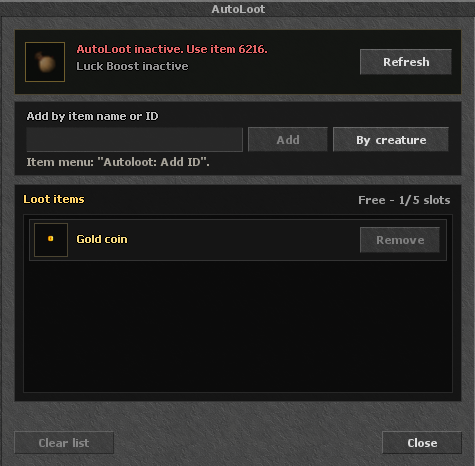
- Open AutoLoot in the client or type !autoloot in chat to check its status.
- With AutoLoot active, enter the item name or ID and click Add. You can also choose Autoloot: Add ID from the item’s menu.
- Check the slot counter. Click Remove to free a slot and Refresh to check the remaining time.
Loot by creature
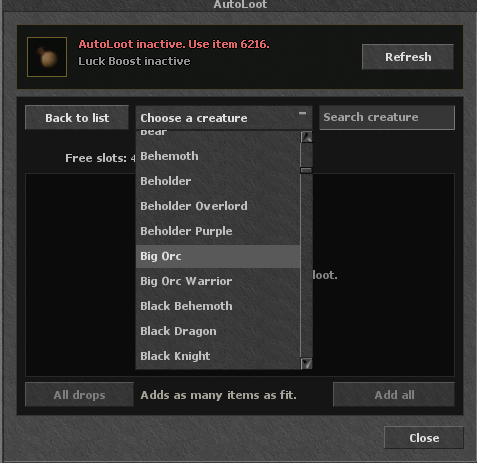
- Click By creature. Pick a monster from the dropdown or search by name.
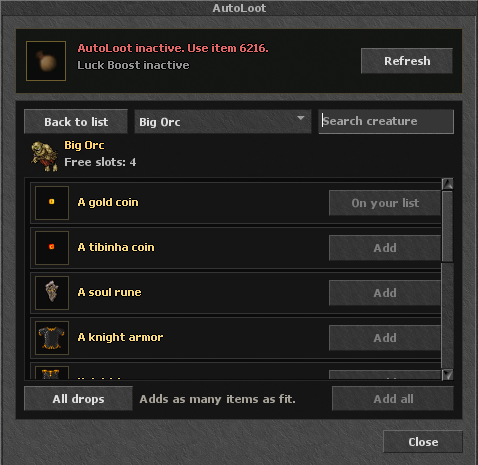
- The suggested list prioritizes coins, special rewards and items with NPC resale value. Switch to All drops to see the other possible drops.
- With AutoLoot active, click Add on a drop or use Add all to fill your free slots with the displayed items. Existing entries stay on your list and are marked On your list.

Engine TFS Cn Soft | Terms of Service | Refund Policy | Privacy Policy